 Budget
Debt Payoff
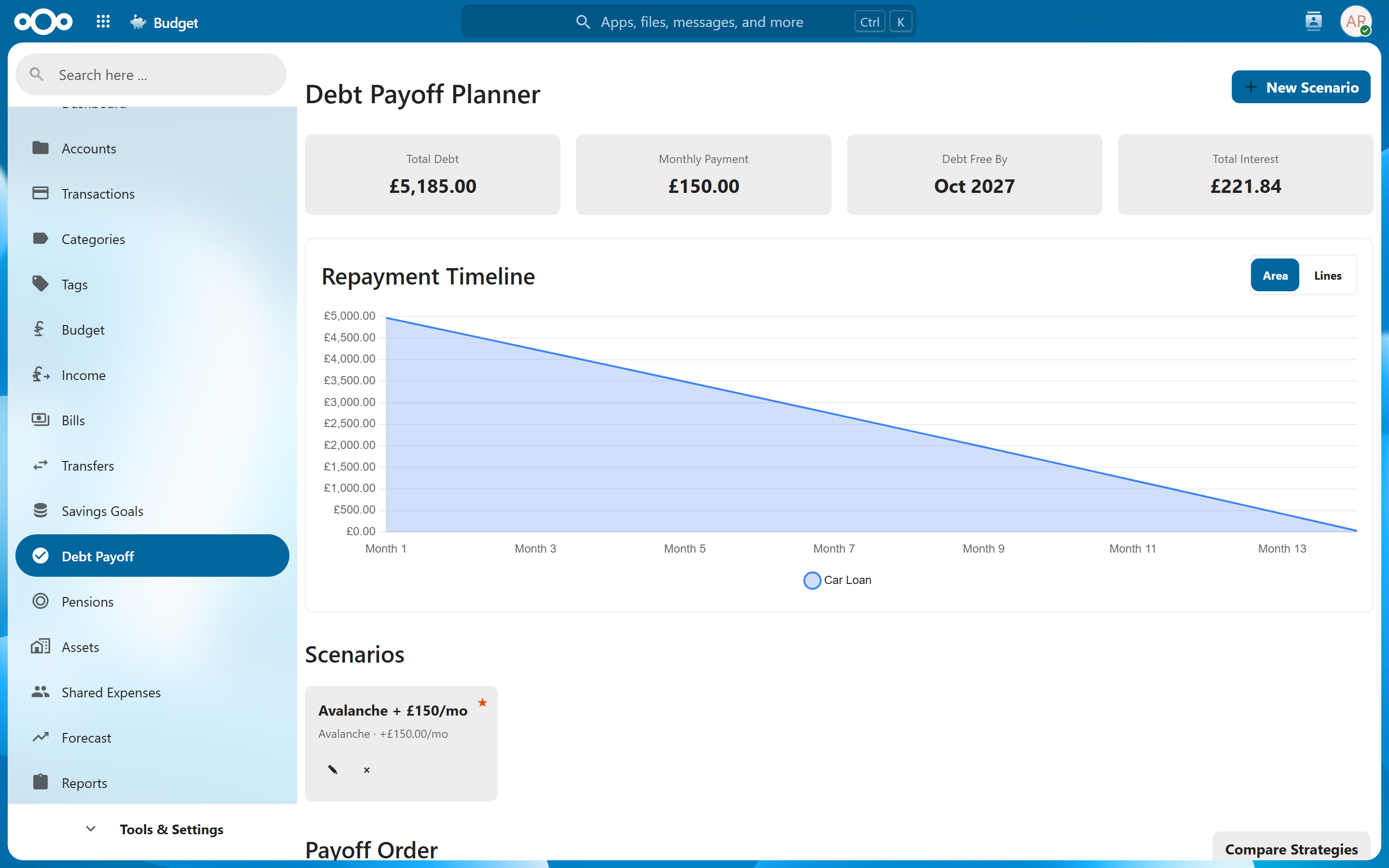
The Debt Payoff planner helps you create a strategy for eliminating debt across multiple accounts. Choose between the Avalanche or Snowball method, see a timeline to debt-free, and track your progress as you make payments.
Overview#
If you carry balances on credit cards, loans, or other debt accounts, the Debt Payoff tool consolidates them into a single plan. It calculates optimal payment schedules, shows total interest costs, and estimates when you will be completely debt-free.
Adding Debts#
The debt payoff planner uses your existing accounts. Any account with a negative balance (credit cards, loans, lines of credit) can be included in your payoff plan.
An account that is paid off, or one you have overpaid, is left out — there is nothing left to plan a payoff for.
Requirements#
For accurate calculations, each debt account should have:
| Field | Description |
|---|---|
| Balance | The current outstanding balance. Stored as a negative number on liability accounts and shown as an "Owed" figure; you enter it as a positive Amount owed. |
| Interest Rate | The annual interest rate (APR) on the account. Set this in the account settings. |
| Minimum Payment | The minimum monthly payment required by the lender. |
Tip: Keep your account balances up to date by importing transactions regularly. The payoff plan recalculates automatically when balances change.
Selecting Debts for the Plan#
Navigate to Debt Payoff to see all eligible accounts. You can include or exclude specific accounts from the plan. This is useful if you want to focus on certain debts while ignoring others (e.g., a mortgage you plan to pay over its full term).
Strategies#
The planner supports two well-known debt repayment strategies:
Avalanche Method (Highest Interest First)#
The Avalanche method directs extra payments toward the debt with the highest interest rate first, while making minimum payments on all other debts.
How it works:
- Make minimum payments on all debts.
- Put any extra available money toward the highest-interest debt.
- Once that debt is paid off, redirect its payment to the next highest-interest debt.
- Repeat until all debts are eliminated.
Advantages:
- Minimizes total interest paid over the life of the plan.
- Mathematically optimal — you will pay less overall.
Trade-off:
- If your highest-interest debt has a large balance, it may take longer to see the first debt eliminated, which can feel slow.
Snowball Method (Smallest Balance First)#
The Snowball method directs extra payments toward the debt with the smallest balance first, regardless of interest rate.
How it works:
- Make minimum payments on all debts.
- Put any extra available money toward the smallest balance.
- Once that debt is paid off, redirect its payment to the next smallest balance.
- Repeat until all debts are eliminated.
Advantages:
- Quick early wins build momentum and motivation.
- You eliminate individual debts faster, reducing the number of payments you manage.
Trade-off:
- You may pay more in total interest compared to Avalanche, since higher-rate debts may linger longer.
Note: Both strategies assume the same total monthly payment. The difference is only in which debt receives the extra funds beyond minimums. Choose Avalanche to save money, or Snowball if staying motivated matters more to you.
Viewing the Payoff Plan#
Once you select a strategy and set your total monthly payment amount, the planner generates:
| Element | Description |
|---|---|
| Timeline Chart | A visual chart showing each debt's balance decreasing over time until eliminated. |
| Debt-Free Date | The projected date when all included debts will be fully paid off. |
| Total Interest Paid | The cumulative interest you will pay over the life of the plan. |
| Monthly Payment Schedule | A breakdown showing how much goes to each debt each month — minimums plus the extra payment directed by your chosen strategy. |
| Payoff Order | The sequence in which debts will be eliminated, with estimated payoff dates for each. |
Tip: Try both strategies and compare the total interest and debt-free dates. Sometimes the difference is small, making the Snowball method's psychological benefits worth the slightly higher cost.
Tracking Progress#
The payoff plan updates automatically as you make payments and your account balances change.
Progress Indicators#
- Total debt remaining — The sum of all included debt balances, shown with the percentage paid off.
- Debts eliminated — A count of how many debts you have fully paid off versus total.
- Ahead/behind schedule — Whether your actual payments are ahead of or behind the plan's projections.
- Interest saved — If you are paying extra or ahead of schedule, the app shows how much interest you are saving versus the original projection.
When Plans Change#
If your situation changes — a new debt is added, interest rates change, or you adjust your monthly payment amount — the plan recalculates automatically. The timeline, interest totals, and payoff order update to reflect the new reality.
Note: The planner assumes consistent monthly payments at the amount you specify. If you pay less in some months, your actual debt-free date will shift later than projected.
Related Features#
- Accounts — Debt accounts (credit cards, loans) provide the balances and interest rates used in the plan.
- Dashboard — The Debt Payoff tile shows your total remaining debt and projected debt-free date. The Days Until Debt-Free counter provides a motivating countdown.
Settings#
The Debt Payoff planner does not have dedicated settings. Interest rates and minimum payments are configured per-account in the account settings.